What Is e-Learning?

What Is e-Learning?

Content

E-learning , or electronic learning, is a structured course or learning experience delivered digitally. It can also include performance support content. There are also many different elements that can make up an e-learning program, such as live or pre-recorded lecture content, video, quizzes, simulations, games, activities, and other interactive elements. Keep in mind that you may also see the term e-learning more broadly as a catchall for any learning content delivered electronically.

E-learning, or electronic learning, is a structured course or learning experience delivered digitally. It can also include performance support content. There are also many different elements that can make up an e-learning program, such as live or pre-recorded lecture content, video, quizzes, simulations, games, activities, and other interactive elements. Keep in mind that you may also see the term e-learning more broadly as a catchall for any learning content delivered electronically.

Content

While ATD style uses a hyphen in the spelling, you may also see it spelled elearning, eLearning, or e learning . E-learning courses are typically managed and administered via a learning management system (LMS).

While ATD style uses a hyphen in the spelling, you may also see it spelled elearning, eLearning, or e learning. E-learning courses are typically managed and administered via a learning management system (LMS).

Content

As the author, Steven D. Foreman, notes in his book, The LMS Guidebook , a learning management system is “a multiuser software application, usually accessed through a web browser. It helps organizations manage training events, self-paced courses, and blended learning programs . It provides automation that replaces rigorous and expensive manual work, saves time, and enables you to organize your content, data, and learners. It tracks and reports on training activity and results.” The popularity of online learning continues to rise.

As the author, Steven D. Foreman, notes in his book, The LMS Guidebook, a learning management system is “a multiuser software application, usually accessed through a web browser. It helps organizations manage training events, self-paced courses, and blended learning programs. It provides automation that replaces rigorous and expensive manual work, saves time, and enables you to organize your content, data, and learners. It tracks and reports on training activity and results.” The popularity of online learning continues to rise.

Key Components of an E-Learning Program
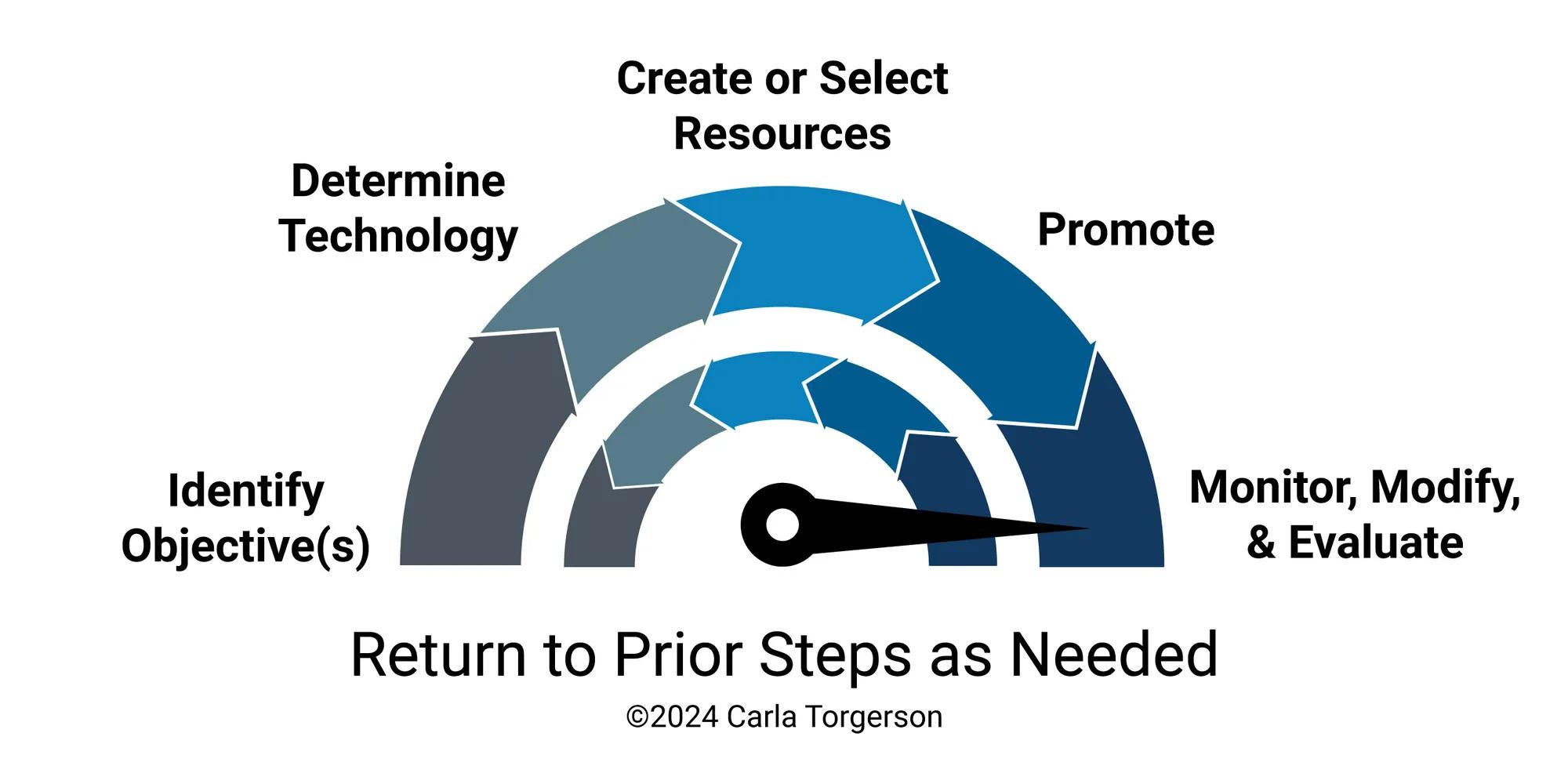
Micro_Learning_Design_Model_GR

Content

Effective e-learning is not just a digital version of a textbook; it is a structured experience that combines instructional science with technolog y. It may be easier to think of e-learning as “digital learning” or “online learning.” Although, e-learning can take many formats beyond a digital course. For example, e-learning can be delivered as a game, video, podcast, quiz, or simulation, among other formats.

Effective e-learning is not just a digital version of a textbook; it is a structured experience that combines instructional science with technology. It may be easier to think of e-learning as “digital learning” or “online learning.” Although, e-learning can take many formats beyond a digital course. For example, e-learning can be delivered as a game, video, podcast, quiz, or simulation, among other formats.

Content

When designing or creating e-learning content, incorporate performance-based learning objectives and use decision-based interactions rather than “click to reveal” activities to improve retention, engagement, and desired job behavior outcomes.

When designing or creating e-learning content, incorporate performance-based learning objectives and use decision-based interactions rather than “click to reveal” activities to improve retention, engagement, and desired job behavior outcomes.

Content

E-learning authoring tools are software or simple keyboard shortcuts that enable you to create custom digital learning content. Authoring tools can range in capabilities, price, ease of use, and functionality. For example, PowerPoint is a popular and accessible authoring tool for many learning designers. Some LMS (Learning Management Systems) are used to deliver learning content and provide authoring tools within the platform.

E-learning authoring tools are software or simple keyboard shortcuts that enable you to create custom digital learning content. Authoring tools can range in capabilities, price, ease of use, and functionality. For example, PowerPoint is a popular and accessible authoring tool for many learning designers. Some LMS (Learning Management Systems) are used to deliver learning content and provide authoring tools within the platform.

Content

Here are some quick design characteristics of e-learning programs:

Here are some quick design characteristics of e-learning programs:

  • Content

    A centralized platform to host, deliver, and track learner progress.

    A centralized platform to host, deliver, and track learner progress.

  • Content

    Authoring Tools or software used to create the content (Articulate Storyline, Adobe Captivate, or even PowerPoint, to name a few).

    Authoring Tools or software used to create the content (Articulate Storyline, Adobe Captivate, or even PowerPoint, to name a few).

  • Content

    Standards (SCORM/xAPI) or technical specifications that ensure your e-learning course “talks” to your learning systems correctly so that completions and scores are recorded.

    Standards (SCORM/xAPI) or technical specifications that ensure your e-learning course “talks” to your learning systems correctly so that completions and scores are recorded.

  • Content

    A strategic mix of multimedia (video, audio, simulations, infographics, text) to prevent cognitive overload.

    A strategic mix of multimedia (video, audio, simulations, infographics, text) to prevent cognitive overload.

Asynchronous E-Learning vs. Synchronous E-Learning

Content

Asynchronous e-learning is self-paced; learners take the course on their own, usually on a laptop. Asynchronous e-learning programs may include pre-recorded lecture content and video, visuals, and/or text, knowledge quizzes, simulations, games, and other interactive elements.

Asynchronous e-learning is self-paced; learners take the course on their own, usually on a laptop. Asynchronous e-learning programs may include pre-recorded lecture content and video, visuals, and/or text, knowledge quizzes, simulations, games, and other interactive elements.

Content

Synchronous e-learning , more commonly referred to as live online training, online learning, synchronous online training, or virtual classroom training, is instructor-led and delivered at the same time as other learners—everyone is just geographically dispersed. This training typically uses a web-conferencing or virtual classroom platform (such as Adobe Connect or GoToTraining) that offers features such as slide or screen sharing, as well as interaction tools such as chat, polling, and screen annotation.

Synchronous e-learning, more commonly referred to as live online training, online learning, synchronous online training, or virtual classroom training, is instructor-led and delivered at the same time as other learners—everyone is just geographically dispersed. This training typically uses a web-conferencing or virtual classroom platform (such as Adobe Connect or GoToTraining) that offers features such as slide or screen sharing, as well as interaction tools such as chat, polling, and screen annotation.

E-Learning vs Traditional Classroom Training

Content

The differences between e-learning and traditional classroom learning rely on the instructional approaches. E-learning is often classified as online learning, while traditional learning methods evoke images of schools. Both online courses and in-person courses may utilize aspects of the other method.

The differences between e-learning and traditional classroom learning rely on the instructional approaches. E-learning is often classified as online learning, while traditional learning methods evoke images of schools. Both online courses and in-person courses may utilize aspects of the other method.

Content

For example, a construction company may deliver training online but have an in-person evaluation. On the flip side, an in-person course may provide training materials face-to-face but assign follow-up work digitally for continuous learning. This is called blended learning.

For example, a construction company may deliver training online but have an in-person evaluation. On the flip side, an in-person course may provide training materials face-to-face but assign follow-up work digitally for continuous learning. This is called blended learning.

Comparison of Learning Methods
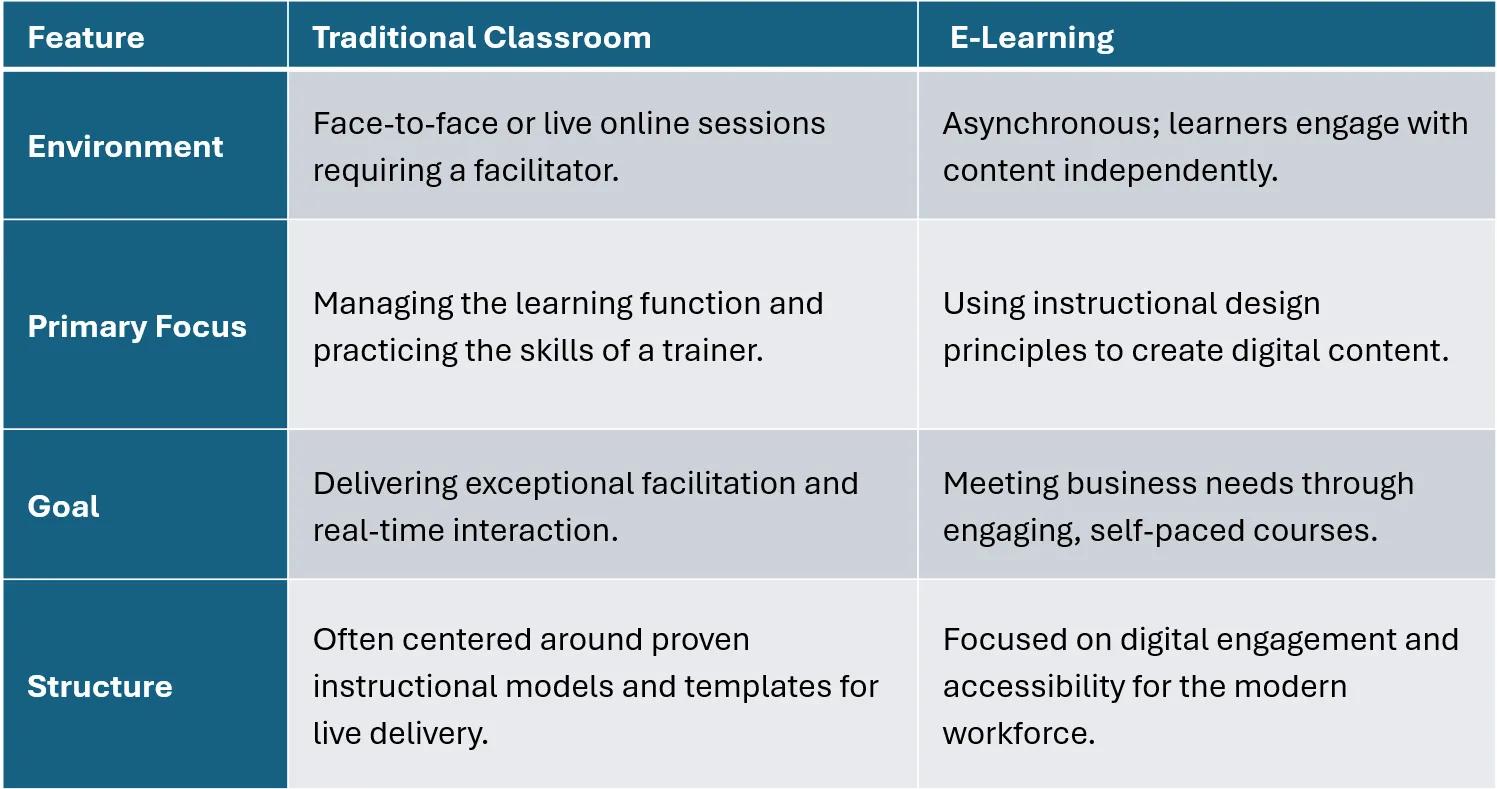
A chart describing the differences between e-learning and traditional classroom learning.

Content

Advantages of E-Learning

Content

According to ATD’s 2021 State of the Industry report , technology-based learning methods, including e-learning, accounted for 80 percent of learning hours used in 2020. Broadly, e-learning falls into two main categories: asynchronous and synchronous.

According to ATD’s 2021 State of the Industry report, technology-based learning methods, including e-learning, accounted for 80 percent of learning hours used in 2020. Broadly, e-learning falls into two main categories: asynchronous and synchronous.

Content

This chart highlights some advantages of both asynchronous and synchronous e-learning compared to in-person classroom training. The biggest difference between an asynchronous and synchronous e-learning course is the ability for a learner to go at their own pace and learn when convenient for them.

This chart highlights some advantages of both asynchronous and synchronous e-learning compared to in-person classroom training. The biggest difference between an asynchronous and synchronous e-learning course is the ability for a learner to go at their own pace and learn when convenient for them.

Content

Benefit

Benefit

Content


Content

Asynchronous E-Learning

Asynchronous E-Learning

Content


Content

Synchronous E-Learning

Synchronous E-Learning

Content

Taken anywhere

Taken anywhere

Content

Content

Content

Taken anytime

Taken anytime

Content

Content

Content

Tracking capabilities

Tracking capabilities

Content

Content

Content

Can be less expensive

Can be less expensive

Content

Content

Content

Highly scalable

Highly scalable

Content

Content

Content

Reduced time away

Reduced time away

Content

Content

Content

Train dispersed groups

Train dispersed groups

Content

Content

Content

Can be more personalized via branching or adaptive learning

Can be more personalized via branching or adaptive learning

Content

Content

Content

Allows for global collaboration

Allows for global collaboration

Content

Content

Content

6 Variables to Consider When Building an E-Learning Course

How Much Time Does it Take to Develop One-Hour of E-Learning?

Content

As shown in the table, e-learning can be less expensive than traditional classroom training. This depends on the number of people taking the course, as e-learning courses typically take longer to produce. So, how long does it take to produce an e-learning course? Unfortunately, there is no single answer . Still, in the following video, author and e-learning expert Diane Elkins outlines six variables you can look at when estimating time to develop an e-learning program:

As shown in the table, e-learning can be less expensive than traditional classroom training. This depends on the number of people taking the course, as e-learning courses typically take longer to produce. So, how long does it take to produce an e-learning course? Unfortunately, there is no single answer. Still, in the following video, author and e-learning expert Diane Elkins outlines six variables you can look at when estimating time to develop an e-learning program:

Content

Some additional guidance can be found in a 2020 survey conducted by ATD. The following is from the ATD blog post “How Long Does It Take To Develop Training? New Question, New Answers” by consultant and author Robyn Defelice.
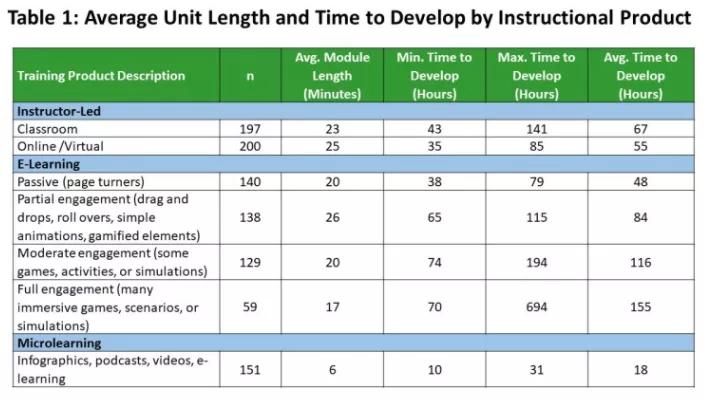
Some additional guidance can be found in a 2020 survey conducted by ATD. The following is from the ATD blog post “How Long Does It Take To Develop Training? New Question, New Answers” by consultant and author Robyn Defelice.

Table Showing Average Unit Length and Time to Develop by Instructional Product.

E-Learning Skills in Demand

Content

In the 2017 ATD research report Next-Generation E-Learning , 89% of those surveyed said that changes in e-learning require their staff to update or add new skills. That research highlighted the skills that talent development professionals need to succeed in e-learning: general e-learning design skills, knowledge of available e-learning tools and applications, skills with specific design tools and software, overall instructional design knowledge and skills, and audio/video design skills.

In the 2017 ATD research report Next-Generation E-Learning, 89% of those surveyed said that changes in e-learning require their staff to update or add new skills. That research highlighted the skills that talent development professionals need to succeed in e-learning: general e-learning design skills, knowledge of available e-learning tools and applications, skills with specific design tools and software, overall instructional design knowledge and skills, and audio/video design skills.

Content

ATD research E-learning: The Evolving Landscape highlights the top skills that are lacking among TD professionals: measuring and evaluating e-learning; deciding whether e-learning is a good choice for the content; designing, writing, and building scenarios; testing courses for usability, functionality, and browser compatibility; and designing the user interface.

ATD research E-learning: The Evolving Landscape highlights the top skills that are lacking among TD professionals: measuring and evaluating e-learning; deciding whether e-learning is a good choice for the content; designing, writing, and building scenarios; testing courses for usability, functionality, and browser compatibility; and designing the user interface.

How E-Learning Works in Organizations

Content

E-learning is beneficial for the organization as well, not just the learner. According to ATD’s research report, Beyond the Basics: How Organizations Are Personalizing and Enhancing E-Learning , e-learning is widespread, with three-quarters of organizations saying that at least half of their learning programs are e-learning. Cost-effectiveness was a major factor in the adoption of e-learning in the workplace, as was access and flexibility for a geographically dispersed learner population.

E-learning is beneficial for the organization as well, not just the learner. According to ATD’s research report, Beyond the Basics: How Organizations Are Personalizing and Enhancing E-Learning, e-learning is widespread, with three-quarters of organizations saying that at least half of their learning programs are e-learning. Cost-effectiveness was a major factor in the adoption of e-learning in the workplace, as was access and flexibility for a geographically dispersed learner population.

Content

Think of e-learning as a “plug-and-play” ecosystem where technical standards ensure that the training content you build or buy works on the platform your employees use.

Think of e-learning as a “plug-and-play” ecosystem where technical standards ensure that the training content you build or buy works on the platform your employees use.

Content

According to “ The ABCs of E-Learning Standards ,” from TD magazine, here is the breakdown of how these components work together:

According to “The ABCs of E-Learning Standards,” from TD magazine, here is the breakdown of how these components work together:

The Infrastructure: LMS and LRS

Content

The Learning Management System (LMS) is the central hub where employees log in, find their assigned “page-turner” courses, and where the company tracks completions. The Learning Record Store (LRS) is a more modern “storage unit” for data. It can track activities that occur outside a traditional course, such as using a flight simulator or practicing CPR on a smart mannequin.

The Learning Management System (LMS) is the central hub where employees log in, find their assigned “page-turner” courses, and where the company tracks completions. The Learning Record Store (LRS) is a more modern “storage unit” for data. It can track activities that occur outside a traditional course, such as using a flight simulator or practicing CPR on a smart mannequin.

The “Language” (Standards)

Content

For the content to “talk” to the system, they must speak the same language. There are three main standards used today:

For the content to “talk” to the system, they must speak the same language. There are three main standards used today:

  • Content

    SCORM: The most common standard. It’s perfect for traditional, slide-based courses. It tracks the "Big Four": completion, pass/fail, score, and time spent.

    SCORM: The most common standard. It’s perfect for traditional, slide-based courses. It tracks the "Big Four": completion, pass/fail, score, and time spent.

  • Content

    xAPI: A high-power tool that tracks almost anything. It records “statements” (for example, “John Smith completed the VR simulation”) and is ideal for mobile learning or games.

    xAPI: A high-power tool that tracks almost anything. It records “statements” (for example, “John Smith completed the VR simulation”) and is ideal for mobile learning or games.

  • Content

    cmi5: The newest standard that combines the best of both. It enables advanced xAPI tracking while letting you easily launch and package content within a traditional LMS.

    cmi5: The newest standard that combines the best of both. It enables advanced xAPI tracking while letting you easily launch and package content within a traditional LMS.

How Data Is Captured

Content

Organizations use these standards to prove training effectiveness and compliance. Basic tracking will log events such as when an employee clicks the “Finish” button in a course. Granular tracking analyzes which questions are challenging for an employee and may require further training. Real-world performance can be tracked by monitoring hand positions or physical tasks, usually in a simulated environment to ensure safety before a worker hits the field.

Organizations use these standards to prove training effectiveness and compliance. Basic tracking will log events such as when an employee clicks the “Finish” button in a course. Granular tracking analyzes which questions are challenging for an employee and may require further training. Real-world performance can be tracked by monitoring hand positions or physical tasks, usually in a simulated environment to ensure safety before a worker hits the field.

Content

Troubleshooting Tip: A common hurdle in organizational e-learning is “lost completions.” This usually happens when a learner closes a browser window before the content sends its final “success” signal to the LMS. Experts recommend always including a clear “Exit” button inside the course to ensure the data is saved correctly.

Troubleshooting Tip: A common hurdle in organizational e-learning is “lost completions.” This usually happens when a learner closes a browser window before the content sends its final “success” signal to the LMS. Experts recommend always including a clear “Exit” button inside the course to ensure the data is saved correctly.

The Future of E-Learning

Content

With the growth of artificial intelligence, there is a shift in how methods are viewed in the modern workplace. In the article “ Human at the Helm ,” it is argued that while technology (like artificial intelligence) can provide content , the human-led talent function (traditional training) provides the capability and trust necessary for deep development. Nevertheless, new technologies inevitably require new skill development. It’s important for trainers, facilitators, and instructional designers to be flexible in their methods.

With the growth of artificial intelligence, there is a shift in how methods are viewed in the modern workplace. In the article “Human at the Helm,” it is argued that while technology (like artificial intelligence) can provide content, the human-led talent function (traditional training) provides the capability and trust necessary for deep development. Nevertheless, new technologies inevitably require new skill development. It’s important for trainers, facilitators, and instructional designers to be flexible in their methods.

Content

In “ AI-Powered Interactivity Delivers a New Level of E-Learning ,” Garima Gupta explores how generative AI is revolutionizing instructional design by introducing a more accessible “Level 4” of interactivity. Traditionally, high-level engagement required resource-intensive simulations or VR; however, AI now enables personalized, real-time learning experiences at lower cost. Gupta highlights four key applications:

In “AI-Powered Interactivity Delivers a New Level of E-Learning,” Garima Gupta explores how generative AI is revolutionizing instructional design by introducing a more accessible “Level 4” of interactivity. Traditionally, high-level engagement required resource-intensive simulations or VR; however, AI now enables personalized, real-time learning experiences at lower cost. Gupta highlights four key applications:

  1. Content

    Digital coaches for on-demand expert guidance

    Digital coaches for on-demand expert guidance

  2. Content

    Role-play simulations with dynamic AI personas

    Role-play simulations with dynamic AI personas

  3. Content

    Auto-assessments that provide instant feedback on open-ended text

    Auto-assessments that provide instant feedback on open-ended text

  4. Content

    Infinite question generators for tailored practice.

    Infinite question generators for tailored practice.

Content

By integrating these tools, L&D professionals can move beyond passive content delivery to create “super learners” through scalable, adaptive, and highly conversational environments. This shift marks a transition from static branching scenarios to truly responsive ecosystems that mirror real-life complexity.

By integrating these tools, L&D professionals can move beyond passive content delivery to create “super learners” through scalable, adaptive, and highly conversational environments. This shift marks a transition from static branching scenarios to truly responsive ecosystems that mirror real-life complexity.

How ATD Can Help You With E-learning

Content

If you’re an experienced classroom trainer or are used to designing classroom training, keep in mind that designing and delivering online courses requires some additional skill sets. Whether you’re new to e-learning, an experienced e-learning instructional designer or developer, or a manager, ATD has content, resources, workshops, and events to help you develop and grow.

If you’re an experienced classroom trainer or are used to designing classroom training, keep in mind that designing and delivering online courses requires some additional skill sets. Whether you’re new to e-learning, an experienced e-learning instructional designer or developer, or a manager, ATD has content, resources, workshops, and events to help you develop and grow.

Key Specialized Programs

Content

Check out these programs to support your professional development in e-learning. These courses are offered both in person and virtually, with each format using online learning platforms that cater to diverse learning styles.

Check out these programs to support your professional development in e-learning. These courses are offered both in person and virtually, with each format using online learning platforms that cater to diverse learning styles.

  • Content

    Training & Facilitation Certificate : This program focuses on the “human” element of the training function, equipping you with the skills to be an exceptional facilitator in a live environment.

    Training & Facilitation Certificate: This program focuses on the “human” element of the training function, equipping you with the skills to be an exceptional facilitator in a live environment.

  • Content

    E-Learning Instructional Design Certificate : This focuses on the technical and pedagogical side of creating asynchronous courses that remain engaging without a live instructor.

    E-Learning Instructional Design Certificate: This focuses on the technical and pedagogical side of creating asynchronous courses that remain engaging without a live instructor.

  • Content

    Instructional Design Certificate : This serves as a bridge between the two, focusing on outcome-based learning using iterative processes applicable to both formats.

    Instructional Design Certificate: This serves as a bridge between the two, focusing on outcome-based learning using iterative processes applicable to both formats.

Content

For access to even more resources, including practical tools and templates, research, and insights, you’re invited to become an ATD member . Learn more !

For access to even more resources, including practical tools and templates, research, and insights, you’re invited to become an ATD member. Learn more!

FAQ

Why should I make an e-learning course?

Content

In her article “ The Potential of E-Learning Solutions ,” Marina Arshavskiy highlights how virtual, blended, and hybrid learning models address modern organizational challenges like rapid technological change, globalized workforces, and diverse learning needs. Using a sales manager’s product launch as an example, the author illustrates how e-learning offers a scalable, cost-effective alternative to traditional training by eliminating travel costs and allowing for asynchronous, self-paced study.

In her article “The Potential of E-Learning Solutions,” Marina Arshavskiy highlights how virtual, blended, and hybrid learning models address modern organizational challenges like rapid technological change, globalized workforces, and diverse learning needs. Using a sales manager’s product launch as an example, the author illustrates how e-learning offers a scalable, cost-effective alternative to traditional training by eliminating travel costs and allowing for asynchronous, self-paced study.

Content

Key benefits include centralized progress tracking via analytics, consistent delivery across time zones, and applications ranging from onboarding to leadership development. While transformative for efficiency and agility, the author notes that highly interactive skills may still require some in-person elements. Ultimately, e-learning is presented as a vital tool for continuous professional development in a fast-paced digital age.

Key benefits include centralized progress tracking via analytics, consistent delivery across time zones, and applications ranging from onboarding to leadership development. While transformative for efficiency and agility, the author notes that highly interactive skills may still require some in-person elements. Ultimately, e-learning is presented as a vital tool for continuous professional development in a fast-paced digital age.

How does e-learning work for a global workforce?

Content

In today’s global business environment, localized e-learning has transitioned from a luxury to a strategic necessity for workforce success. As previously mentioned, ATD’s research team has discovered that 86% of organizations agree that localization significantly improves training effectiveness by driving higher engagement, better knowledge retention, and superior on-the-job performance. Effective localization goes far beyond simple translation; it requires comprehensive adaptation of linguistic nuances, cultural references, multimedia elements, and technical standards such as UI design and legal requirements. While 68% of companies have begun localizing content, many still struggle with resource constraints. If you don’t have an internal team able to create inclusive, culturally relevant learning experiences, you may need to find an external vendor.

In today’s global business environment, localized e-learning has transitioned from a luxury to a strategic necessity for workforce success. As previously mentioned, ATD’s research team has discovered that 86% of organizations agree that localization significantly improves training effectiveness by driving higher engagement, better knowledge retention, and superior on-the-job performance. Effective localization goes far beyond simple translation; it requires comprehensive adaptation of linguistic nuances, cultural references, multimedia elements, and technical standards such as UI design and legal requirements. While 68% of companies have begun localizing content, many still struggle with resource constraints. If you don’t have an internal team able to create inclusive, culturally relevant learning experiences, you may need to find an external vendor.

How can I make e-learning accessible?

Content

As a designer, it is your job to ensure that digital content is functional and inclusive for all learners, regardless of their physical or cognitive abilities. Learning expert Tim Slade says that accessibility in e-learning ensures:

As a designer, it is your job to ensure that digital content is functional and inclusive for all learners, regardless of their physical or cognitive abilities. Learning expert Tim Slade says that accessibility in e-learning ensures:

  • Content

    Inclusivity: Learners with visual, hearing, or mobility impairments can interact with the material using tools like screen readers or keyboard navigation.

    Inclusivity: Learners with visual, hearing, or mobility impairments can interact with the material using tools like screen readers or keyboard navigation.

  • Content

    Legal & Professional Standards: Organizations increasingly require content to meet standards like Section 508 or WCAG to ensure equitable access.

    Legal & Professional Standards: Organizations increasingly require content to meet standards like Section 508 or WCAG to ensure equitable access.

  • Content

    Better User Experience: Features like closed captioning or logical tab orders often benefit all users, providing a more organized and flexible learning environment.

    Better User Experience: Features like closed captioning or logical tab orders often benefit all users, providing a more organized and flexible learning environment.

Content

In short, accessibility transforms e-learning from a restricted resource into a universal one that respects the diverse needs of your target audience.

In short, accessibility transforms e-learning from a restricted resource into a universal one that respects the diverse needs of your target audience.

Content

To create accessible e-learning, you should first master the specific accessibility features of your chosen authoring tool, such as Articulate Storyline or Adobe Captivate . Focus on foundational elements like closed captioning for audio, ALT text for visual elements, and a logical tab order for keyboard navigation. Finally, conduct user acceptance testing with learners who rely on these features to gain practical insights. While guidelines like WCAG can be complex, starting with these basics ensures your digital content is inclusive and functional for all learners.

To create accessible e-learning, you should first master the specific accessibility features of your chosen authoring tool, such as Articulate Storyline or Adobe Captivate. Focus on foundational elements like closed captioning for audio, ALT text for visual elements, and a logical tab order for keyboard navigation. Finally, conduct user acceptance testing with learners who rely on these features to gain practical insights. While guidelines like WCAG can be complex, starting with these basics ensures your digital content is inclusive and functional for all learners.

Technology Application Topic Page

BLOGS

Technology Application Topic Page

Content

Explore latest e-learning articles for all levels. Find strategies, insights, and best practices to elevate your expertise. Start here!

Explore latest e-learning articles for all levels. Find strategies, insights, and best practices to elevate your expertise. Start here!

Learning Technologies Newsletter

NEWSLETTER

Learning Technologies Newsletter

Content

Serving all professionals who design and develop technology-based learning solutions. Sign up today!

Serving all professionals who design and develop technology-based learning solutions. Sign up today!

E-Learning Professionals

COURSES BY ROLE

E-Learning Professionals

Content

Discover courses for e-learning designers covering topics like instructional design, online facilitation, and authoring tools. Explore courses !

Discover courses for e-learning designers covering topics like instructional design, online facilitation, and authoring tools. Explore courses!
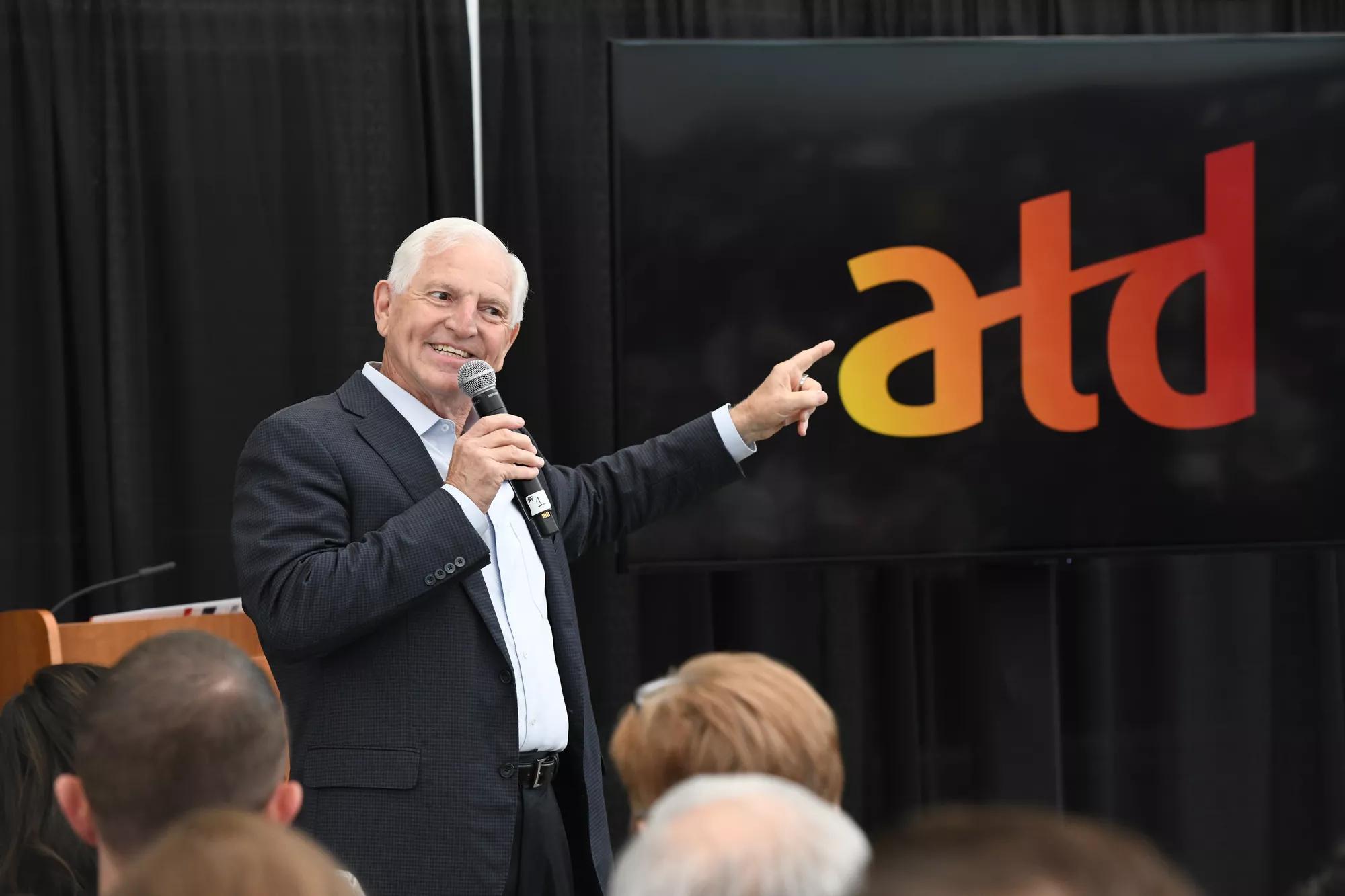
ATD Events

EVENTS

ATD Events

Content

T alent development professionals come together to give you conference experiences that are diverse in education, solutions, and opportunities. Learn more!

Talent development professionals come together to give you conference experiences that are diverse in education, solutions, and opportunities. Learn more!

Talent Development Glossary Terms

GLOSSARY TERMS

Talent Development Glossary Terms

Content

Learn about essential terms and need-to-know expressions for training and development professionals. Explore now!

Learn about essential terms and need-to-know expressions for training and development professionals. Explore now!

Free Trainer's Guide: Finding Success in Virtual Training

This e-book offers guidelines and solutions of how to create and facilitate virtual training, move training from an instructor-led in-person event to a virtual classroom setting, optimize the experience, and use tools to make your training event a success.